Best A/B Split Testing Plugins For WordPress and WooCommerce

A/B Testing Plugins for WordPress and WooCommerce allows the Site Admin to decide the best page variation that helps in achieving goals such as boost purchase, increase subscribers, etc. Some of the best WordPress A/B Testing Plugins are developed by Multidots, Inbound Now, Jason Funk etc.

What is A/B Testing?

A/B testing also known as Split testing is the process of comparing the performance of different web page variants. Different variations of a Web page is displayed to similar visitors at the same time. The Performance of the different variations is tracked.

How does it work?

Initially, the original web page is modified according to the preferences. The modified page will be the second version of the original page. The changes made can be smaller changes like an alternative title/alternate image or huge changes like a completely redesigned page. Customers might visit the original page or modified page and their attention given to the pages will be clearly monitored. So that, you will come to know the conclusion whether the modified page has gained a positive feedback or negative feedback.

Why should one use A/B Testing?

A/B Testing allows individuals, teams and companies to make careful changes to their user experiences while collecting data based on the results. It can be used consistently to improve the experience and goal like increasing the conversion rate over a period of time.

For example: If a company wish to increase their sales, then they should try A/B Testing to make changes on the alternate product title, feature image, short description, etc.

By changing one at a time helps to know whether the changes made had a huge effect on the customers or not. Based on this experiment, you can demonstrate the other improvement to make the product in a better way.

WordPress A/B Testing Plugins

Here we will see the Best free WordPress A/B Testing plugins,

1. WordPress Landing Pages

WordPress Landing Pages is a free WordPress Plugin developed by Inbound Now. It allows you to run A/B Testing (or) Split Test on landing pages of your WordPress site without any coding changes. It helps to determine the lead flow of the site, monitor and track conversion rate.

Some of the main features offered by this plugin are as follows,

  • Create beautiful Landing Pages
    Allows you to create Landing Pages on your WordPress site using templates.
  • Visual Editor
    The plugin comes with Visual Editor to preview changes dynamically.
  • Track conversion rates
    For Continuous optimization, Plugin allows tracking conversion rates on Landing Pages.
  • Pre-populate Forms
    Increase conversion rates by Pre-populate Form with Visitors data.

Check out the WordPress Landing Pages premium version which offers more features.

2. Title Experiments Free

Title Experiments Free plugin is developed by Jason Funk which helps to run A/B Testing on your page or post titles.

Some of the main features offered by this plugin are as follows,

  • Create Multiple Titles
    Multiple titles for each of your pages and post can be created.
  • Result of Experiments
    It provides the result of best Post/Page title variation with higher click-through rate.

Check out the Title Expirements premium version which offers more features.

3. Single Page Tester

Single Page Tester is a free plugin helps you to run the Split Tests in WordPress without making any changes in the code. Using this plugin, it is quite easy to create a split test for page or post.

Features offered by this plugin are as follows,

  • SEO Friendly
    Follows the Google Webmaster guidelines and recommendations.
  • Analytics
    Tracks unique visitors to each variation in a split test.
  • Cache Compatible
    Offer support for cache systems in WordPress.

Check out the Simple Page Tester premium version which offers more features

4. WordPress Calls to Action
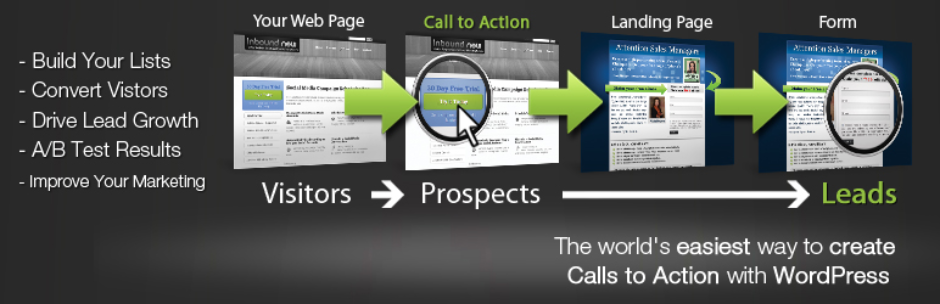
WordPress Calls to Action plugin is a free plugin which helps to run A/B Testing on Call To Action Buttons. This Free plugin allows creating the call to action using Templates.

Some of the main features offered by this plugin are as follows,

  • Create beautiful calls to action
    Allow you to create calls to action on your WordPress site using templates.
  • Visual Editor
    It comes with Visual Editor to preview changes dynamically.
  • Popups Calls to Actions
    Call to Actions in Popups can be created for improved conversion rates.
  • Track conversion rates
    For Continuous optimization, Plugin allows tracking conversion rates on calls to action.
  • Clone existing calls to action
    It allows you to run A/B Split tests on existing calls to action by cloning them.


5. WordPress And WooCommerce A/B Testing

WordPress and WooCommerce A/B Testing plugin is developed by Multidots. This Plugin helps you to create variations of any of your WordPress website pages and allow you to set how many percentages of visitors should see particular variations. Based on the settings, the plugin automatically divides the traffic to each variation you created. It provides analytics of each variation and determines which variation performs well.

Features offered by this plugin are as follows,

  • A/B testing experiments
    Allows to create A/B Testing experiments.
  • Create multiple variations
    Multiple variations of a particular Web page can be created and experimented.
  • Visual page editor
    The plugin comes with visual page editor to edit each variation.
  • Script editor
    The plugin comes with Script editor to add an additional script for each variation.
  • Instant control over the experiment
    Experiments can be turned On or Off at any instant.
  • View Result
    Result for each Experiment is provided by this plugin to find best working variation.


10 Best Medical WordPress WooCommerce Themes for Doctors, Hospitals, Clinics and Pharmacies

Medical or Healthcare Websites can be easily created using WordPress Themes. 10 Best Medical WordPress WooCommerce Themes for Doctors, Hospitals, Clinics and Pharmacies are explained in this article.

Most of the Medical or Healthcare WordPress Themes offers valuable features which may be needed by any Healthcare based Websites.

Some of the key features need to consider before selecting Medical/Healthcare theme,

  • Check for the doctor’s appointment form and timetable
  • Separate page template for doctor’s profile
  • Support for Google API to display the hospital location
  • Support with WooCommerce

Some of the best Medical WordPress Themes which are compatible with WooCommerce is as follows.

1. MediCenter – Responsive Medical WordPress Theme

Medicenter – Responsive Medical WordPress Theme is a WooCommerce premium theme which is developed by QuanticaLabs. It is highly suitable for doctors, health clinics, hospitals, etc. Setting up a shop to run pharmacy is quite easy. It is also suitable for any health or beauty related businesses like a medical laboratory, veterinary clinic, spa, etc.

The Theme has multiple page layouts, Ajax based contact form, Isotope Gallery, Google Map, smart sticky column etc. It includes Visual Composer and Slider Revolution Plugins. Medicenter is supported with RTL, WPML compatible, Translation ready with MO/PO files, Cross browser compatible theme. It has a responsive layout to adapt any device.

Using this theme, you can set the following features in your site

  • Appointment form
  • Doctor’s Timetable
  • Doctor’s Profile
  • Map
  • WooCommerce shop

Price: $59

Check out more details and purchase MediCenter – Responsive Medical WordPress Theme here.

2. Care – Medical and Health Blogging WordPress Theme

Care – Medical and Health Blogging WordPress Theme is a WooCommerce premium theme which is developed by MNKY.

It offers Boxed & Full-Width Layouts, Scalable Vector Icons With Builder Panel, Advanced Options Panel, Multiple Blog Layouts and Header Options. It also comes with Visual Composer, Timetable Responsive Schedule, and Slider Revolution plugins. Care supports WPML and RTL.

Using Care, you can set the following features in your site

  • Doctor’s Timetable
  • Doctor’s Profile
  • Map
  • WooCommerce shop

Price: $49

Check out more details and purchase Care – Medical and Health Blogging WordPress Theme here.

3. MedicalPress – Health and Medical WordPress Theme

MedicalPress – Health and Medical WordPress Theme is a WooCommerce premium theme developed by InspiryThemes.

This theme has various custom post types such as Doctors, Services, Gallery Items, FAQs, Testimonials. It has Google Map, AJAX Contact Form Support, Appointment form to manage online appointment. It is shipped with Visual Composer, Revolution Slider plugins and compatible with WooCommerce and WPML.

Using MedicalPress, you can set the following features in your site

  • Doctor’s Profile
  • Map
  • Appointment form
  • WooCommerce shop

Price: $59

Check out more details and purchase MedicalPress – Health and Medical WordPress Theme here.

4. Medical & Dentist – Medical WordPress

Medical & Dentist – Medical WordPress Theme is a responsive WordPress theme developed by vamtam. It is highly optimized for SEO. Visual Composer, Timetable Responsive and Revolution Slider plugins are bundled with the theme.This theme is compatible with major WordPress plugin such as Yoast SEO Plugin, bbPress, Total Cache, Contact Form 7, Gravity Form etc. It is supported with WPML and translation ready with PO/MO files.

Using Medical & Dentist, you can set the following features in your site

  • Doctor’s Timetable
  • Appointment form
  • Map
  • WooCommerce shop

Price: $69

Check out more details and purchase Medical & Dentist – Medical WordPress Theme here.

5. SoulMedic Health – Medical & Health Care Theme

SoulMedic is Modern WordPress/WooCommerce theme for Medical and HealthCare which is developed by designthemes. It has Multiple page layouts, shortcodes, and custom widgets. It also has inbuilt page builder to design beautiful pages and multiple design components such as a features lists, carousels, testimonials, pricing table, etc. It looks great on all devices due to its responsive design and retina graphics. SoulMedic is supported with WPML and RTL which makes easy to build multilingual sites.

Using SoulMedic, you can set the following features in your site

  • Map
  • Appointment form
  • WooCommerce shop

Price: $59

Check out more details and purchase SoulMedic Health – Medical & Health Care Theme here.

6. MediCure – Health & Medical WordPress Theme

Medicure is a Health and Medical WordPress theme is developed by cmsmasters. It has various shortcodes to build good-looking pages and custom form builder. Medicure is highly responsive, retina ready and has detailed Knowledgebase.

Using SoulMedic, you can set the following features in your site

  • Doctor’s Profile
  • Appointment form
  • WooCommerce shop

Price: $49

Check out more details and purchase MediCure – Health & Medical WordPress Theme here.

7. Healthflex – Medical Health WordPress Theme

Healthflex is a Premium WordPress/WooCommerce Theme which is developed by plethorathemes . Visual Composer plugin comes along with this theme. It can be easily integrated with Google Maps, Twitter and Flickr using their respective APIs.It is supported with WooCommerce, WPML, Ecwid Shopping Cart, Contact Form 7 and Mailchimp. Healthflex is highly Responsive and flexible theme to use. Some of the key features are OWL sliders, Lightbox functionality, Team Members shortcode, CV custom post type, One-Click Demo Import etc.

Using Healthflex, you can set the following features in your site

  • Doctor’s Profile
  • Appointment form
  • WooCommerce shop
  • Map

Price: $64

Check out more details and purchase Healthflex – Medical Health WordPress Theme here.

8. Clinico – Premium Medical and Health Theme

Clinico is a premium WooCommerce theme which is coded by CreativeWS. It provides wide and boxed layouts, predefined colour schemes, multiple widgets, page layouts, content elements, contact form, etc. Revolution Slider plugin is included with this theme. It supports Events Calendar Pro, WPML, WooCommerce, and Contact Form 7. It is compatible with various browsers.

Using Clinico, you can set the following features in your site

  • Doctor’s Profile
  • Appointment form
  • WooCommerce shop
  • Map

Price: $59

Check out more details and purchase Clinico – Premium Medical and Health Theme here.

9. Apicona – Health & Medical WordPress Theme

Apicona is Health & Medical WordPress/WooCommerce Theme developed by thememount. It includes Visual Composer and Revolution Slider plugins. Apicona supports WooCommerce, WPML, Mega Menu. It offers One Click demo content import, W3C validated code output, multiple Header styles, Unlimited skin colour, unique search page, custom child theme, etc. It is fully responsive and will respond on any device.

Using this theme, you can set the following features in your site

  • Doctor’s Profile
  • Appointment form
  • WooCommerce shop
  • Map

Price: $49

Check out more details and purchase Apicona – Health & Medical WordPress Theme here.

10. Physio – Physical Therapy & Medical Clinic WP Theme

Physio is a WordPress theme for Medical or Therapy related services developed by QreativeThemes. It includes a Drag and Drop Page Builder with it. Using Theme Customizer, it is easy to change the visual style of the theme and preview the changes. Physio supports Right to Left languages, translation ready and WPML compatible.

Using this theme, you can set the following features in your site

  • Appointment form
  • WooCommerce shop
  • Map

Price: $59

Check out more details and purchase Physio – Physical Therapy & Medical Clinic WP Theme here.

Best WooCommerce Refund Plugins

WooCommerce Refund System can provide an efficient way for managing refunds in your WooCommerce Shop. Some of the Best WooCommerce Refund Plugins are developed by YITH, StoreApps and FME Addons.

What is a WooCommerce Refund System

A WooCommerce Refund System allows the customers to contact the site admin when they need a refund without leaving the site. The site admin can respond to the refund requests and also issue refunds without leaving the site.

Existing Workflow for Refunds in a WooCommerce Shop

  • Customer purchase products from the shop
  • Customer feels that they need to return a product and request for a refund
  • They have to contact the site admin by sending an email
  • Site admin has to reply to the email and if the site admin decides to offer a refund for the purchase, then the site admin has to manually locate the order placed by the customer and then issue the refund.
  • Once the refund has been issued, the site admin will have to notify the customer manually who initiated the refund request.

Workflow for Refunds in a WooCommerce Shop with a Refund System

  • Customer purchase products from the shop
  • Customer feels that they need to return a product and request for a Refund
  • If the Customer has not exceeded the time for refund, then they can directly submit a refund request from their My Account Page stating the reason for the refund.
  • The submitted refund requests will be listed for site admin’s approval. Site admin can review the refund request and offer the refund in the form of currency or store credits which can be used for future purchases.
  • The site admin will also have the option of paying the refund amount directly to the customer’s account from the site.

Benefits of having a Refund System in a WooCommerce Shop

1. Easy Refund Process

  • Refund System makes the overall refund process easier. Your customers can easily request for refunds directly from the site.

2. Less chance of Losing a Customer

  • Most of the Refunds happen because the customer was not happy with their purchase.
  • Providing them with a proper way to get a refund will increase the chance of the same customer making a purchase again on your shop in future.

3. Guaranteed Future Sales

  • Providing Refunds in terms of Coupons/Store Credit will ensure that your customers will make future purchases in your site which in turn guarantees future sales.

4. Saves a lot of Time

  • Managing the Refund requests manually is a huge task for the Site Admins. A Refund System keeps track of all the refund requests and also allows you to pay for the same without leaving the site.

5. Gain the trust of your Buyers

  • Having a Refund System in place will allow the customers to buy your products with more confidence. They need not worry about how to get a refund when they need one.


Solutions available for Setting up a Refund System in Your WooCommerce Shop

1. YITH ADVANCED REFUND SYSTEM FOR WOOCOMMERCE

Price: $69

YITH Advanced Refund System for WooCommerce is a premium WooCommerce Plugin developed by YITH. This plugin helps in making the refund process easier for the Customers as well as the Site Admin

Some of the key features offered by this plugin are listed below,

  • Allow refund requests for a whole order or for a single product
  • Set a limit on the number of days within which customers can ask for a refund
  • Refund Requests can be Approved Automatically / Manually
  • Refund Amount can be paid Automatically / Manually
  • Refund Amount can be offered via Coupon Codes
  • Refund can be offered based on product quantities
  • Restock the product automatically upon Refund
  • Minimum Order Total Threshold for Refund Requests
  • Products can be configured as Non-Refundable Products

Check out more details and purchase YITH Advanced Refund System for WooCommerce

2. WooCommerce Smart Refunder

Customer Refund Request Form

Admin Manage Refund Form

Price: $79

WooCommerce Smart Refunder is a premium WooCommerce plugin which is developed by StoreApps. Some of the key features offered by this plugin are listed below

Features

  • Customers can request for refund from my account page
  • Customers can request full or partial refunds
  • Customers get instant refunds for their orders (Restricted to specific Payment gateways)
  • Site Admin can manually process the refund requests
  • Site Admin can issue cash refunds or store credits

Checkout more details and purchase WooCommerce Smart Refunder

3. WooCommerce Order Returns/Refund Plugin

Price: $59.99

WooCommerce Order Returns/Refund plugin is a premium WooCommerce extension developed by FME Addons. Some of the key features offered by this plugin are listed below

Features

  • Customers can submit refund requests from their My Account Page
  • Customers can state the reason for requesting a Refund
  • Customers can request for Full refund or for a partial Refund
  • Time duration for submitting a refund request can be customized
  • Refund amount can be offered as coupons

Check out more details and purchase WooCommerce Order Returns/Refund Plugin

4. Hoicker WooCommerce Refund

Price: Free

Hoicker WooCommerce Refund is a module in HOICKER plugin developed by HOICKER. Hoicker WooCommerce Refund allows your customers to Request Refund for their orders directly from their My Account page. You can manage all the Refund Requests in a single place which will ease up your work.

Features

  • Users can Request for Refund for complete Order or for Specific Products in an Order
  • Site Admin can Approve/Reject Refund Requests
  • Email Notification for all Refund Processes
  • Follow-up Messaging to avoid Refunding
  • Amount can be Refunded directly to Hoicker Wallet
  • Minimum Order Amount for Requesting Refund can be set
  • Tax Cost can be Refunded Optionally
  • Requesting Refund can be allowed only for specific days from placing Order

Check out more details and get Hoicker WooCommerce Refund here

5 Best WooCommerce Coupon Plugins

Best WooCommerce Coupon Plugins

Offering Coupons is one of the best ways to reward your customers in your WooCommerce Shop. In this article, we will list the 5 Best WooCommerce Coupon Plugins for offering coupons to your customers.

Benefits of WooCommerce Coupon Plugins

1. Increase Loyalty

Offering coupons will Increase the Loyalty of your Customers. Loyal Customers will often make repeated purchases on your site.

2. New Buyers

Existing customers will often refer your site to their friends. So, there is more chance that your site will get more new Buyers.Continue reading

WooCommerce Dynamic Pricing Discounts

WooCommerce Dynmaic Pricing Discounts

Product Pricing strategy is important for the success of a WooCommerce Shop. In this article, we will explain about WooCommerce Dynamic Pricing and the ways to offer Dynamic Pricing in a WooCommerce Shop.

What is WooCommerce Dynamic Pricing?

The term WooCommerce Dynamic Pricing refers to modifying the price of the products automatically based on various scenarios in order to bring more sales to the WooCommerce Shop.

1. Running a Sale Campaign
The price of the products may have to be automatically reduced during the sale campaign and price should switch back to the original price once it is over.

2. Competitive Pricing
Price of the Products may have to be Increased/Decreased in order to keep up with the competing Products.

3. New Buyers
Discounts/Offers may have to be provided for new buyers in order to gain their trust. Therefore, the user may make more purchases in future.

4. Stock Clearance
Old Stocks may have to be cleared by offering a discount on the product price.

5. User Based Discounts
Discounts may have to be given for frequent buyers.


Solution for WooCommerce Dynamic Pricing

In order to setup Dynamic Pricing on a WooCommerce Shop, a plugin may be needed. Two of Continue reading

How to Recover WooCommerce Abandoned Cart

How to Recover WooCommerce Abanadoned Cart

WooCommerce Cart Abandonment is the main reason for losing sales. But it is easy to recover WooCommerce Abandoned Cart using a plugin thereby recovering the lost sales. Let’s discuss more in detail about cart abandonment problem and the ways to recover the abandoned cart in the WooCommerce shop.

WooCommerce Cart Abandonment

In a WooCommerce environment, if a user adds products to cart and left the site without completing the purchase, then that process is termed as WooCommerce Cart Abandonment.

There are several reasons for a cart abandonment to occur on a WooCommerce shop. What ever may be the reason, the result will be the same. i.e. revenue loss for the site owner. According to a report from Business Insider, nearly 70% of the visitors who visit an e-commerce shop do not complete their purchase. Yes, you read that right, More than half of the visitors are not completing their purchase, which results in cart abandonment. If you are not aware of this then, it’s time for you to make a decision.

Continue reading

Best WooCommerce Subscriptions for Recurring Payments

Best WooCommerce Subscriptions

For supporting recurring payments, a WooCommerce Subscription Plugin is needed. Some of the best WooCommerce Subscriptions are developed by Prospress, YITH, Fantastic Plugins, etc.

Necessity of WooCommerce Subscriptions

Subscription Business Model is beginning to gain more popularity in the recent times. Some of the major players especially in the software industry have sensed this opportunity and switching to recurring payments. SaaS also needs recurring payments.

Benefits of Recurring Payments in WooCommerce

  • Convenient for Buyers
    Buyers need not make repeated purchases thereby saving time for the buyers. The buyer will place the order initially and they will be automatically charged for their renewals.
  • Stock Management
    Site admin can assess the stock required for fulfilling the orders well in advance. So that they can refill the stock based on the upcoming renewals.
  • Increased Average Customer Lifetime Value
    The average customer lifetime value for a subscription service depends on the duration of the subscription plan to which they are subscribed. So customer lifetime value will keep on increasing as long as their subscription stays active.
  • Assured Price
    Customers who are subscribing to a service/product need not worry about price hike in future. They will receive the product/service for the same price which they subscribed.
  • Scalability
    Customers can Upgrade/Downgrade their subscription plan based on their needs.
  • Additional Revenue
    During the course of a subscription, the site admin can offer additional offers/deals which can bring in additional revenue.
  • Increased Customer Relationships
    Customers who have subscribed to a product for a long time will have good faith in your brand and it is more likely that they will continue to make more purchases in future.

Continue reading

Top 25+ Popular WooCommerce Payment Gateway Plugins

Payment Method is critical for any e-commerce shop. Customers often abandon their purchase because their preferred payment gateway is not available. Check out the Top 25+ Popular WooCommerce Payment Gateway Plugins.

1. WooCommerce PayPal Express Checkout Payment Gateway


WooCommerce PayPal Express Checkout Payment Gateway is a free WooCommerce plugin which allows your customers to pay for the order directly from the cart page.


2. WooCommerce PayPal Adaptive Split Payment


WooCommerce PayPal Adaptive Split Payment gateway is a premium plugin which allows you to split the payments made by the buyers to multiple PayPal accounts. The amount can be split between a maximum of 6 receiver accounts. Different commission percentage can be given for each receiver.


3. WooCommerce Stripe Payment Gateway


WooCommerce Stripe Payment Gateway is a free plugin using which users can make payments by giving their credit card number, expiry date and CVC securely from the site itself. It accepts Visa, MasterCard, American Express, Discover, JCB, Diners Club and more cards. WooCommerce Stripe Payment Gateway also supports Apple Pay.


4. SUMO Subscriptions – WooCommerce Subscription System


SUMO Subscriptions – WooCommerce Subscription System is a premium subscriptions extension for WooCommerce. SUMO Subscriptions comes with three inbuilt payment gateways which can be used to charge normal products as well as subscription products. The inbuilt payment gateways in the plugin are as follows

  • SUMO Subscriptions – PayPal Adaptive Payment Gateway
  • SUMO Subscriptions – PayPal Reference Transactions Payment Gateway
  • SUMO Subscriptions – Stripe Payment Gateway

Continue reading

SUMO Reward Points – WooCommerce Reward System

Reward Points/Loyalty Points

Reward Points otherwise known as Loyalty Points can be awarded to buyers every time they sign up for an account, purchase, social promotion, refer new buyers, review a product, etc. The earned points can be redeemed to get a discount on future purchases.

When a new user makes a purchase on an e-commerce site, the possibility of that user making the second purchase depends on many factors out of which Reward Points / Loyalty Points is one of the main factors. If the Buyer receives reward points during the purchase, it is more likely that they will make their next purchase to redeem the points earned and earn more points.

Benefits of Reward Points

  • Customer Retention rate will be more because users who have earned Reward Points often tend to make repeated purchases in order to earn more Reward Points or use their accumulated reward points
  • Loyal Customers often refer your site to their friends and relatives which will bring new buyers to the site
  • Increases your conversion rate
  • Increases your average customer lifetime value
  • Can reduce your Promotion cost as loyal buyers will make repeated purchases and also refer new buyers
  • Helps in building a close relationship with your customers
  • Makes your customers happy

Continue reading