Top 5+ Best Authorize.net Plugins for WooCommerce and WordPress

Authorize.net payment gateway is used to process online payments and accept credit/debit cards on your WooCommerce store in a secure way. In this article, We have listed some of the best WooCommerce and WordPress Authorize.net Plugins.

WooCommerce Authorize.net Plugins
1. The Authorize.Net CIM
2. The Authorize.Net AIM
3. The Authorize.Net SIM
4. Authorize.Net Payment Gateway
5. Authorize.net Payment Gateway
6. YITH Authorize.net Payment Gateway

WordPress Authorize.net Plugins
7. Authorize.net – Simple Donations
8. EC Authorize.net

Native WooCommerce Authorize.net Plugins
1. The Authorize.Net CIM


Authorize.Net CIM is used for payment processing and it a advanced integration method from Authorize.Net payment gateway to offer safe and affordable credit card and eCheck processing. Customers can save their credit cards in their WooCommerce account for fast and easy checkout. An SSL certificate is required.

Some of the key features offered by this plugin are as follows,
– Can be used to accept international transactions
– Customers can make payment for their orders without leaving the checkout page. Customers can also securely save their payment method to their account for easier checkout
– It supports for refunds/voids automatically within WooCommerce
– It Accepts all Major Credit Cards / Debit Cards – Visa®, MasterCard®, American Express®, etc
– It supports WooCommerce Subscriptions and WooCommerce Pre-Orders

2. The Authorize.Net AIM


The AIM version of the Authorize.net Payment Gateway extension allows you to keep your customers within your site for the entire process. An SSL certificate is required for PCI compliance.

Key features offered by this plugin are as follows,
– Customers never leave your site during checkout
– Adds a mobile-friendly checkout with numerical inputs for card type and security code
– Show detailed decline messages at checkout instead of generic messages
– Use the gateway in Authorize.net Emulation mode to allow Authorize.net emulation by other payment processors
– Customer checkout experience is highly customizable

3. The Authorize.Net SIM


The Authorize.Net SIM allows you to securely accept credit card payments in your WooCommerce  Shop. The Credit Card form is hosted by Authorize.net Servers thereby reducing PCI Compliance Workload for the Site Admin. Also, it provides support for checkout using Authorize.Net eChecks.

Some of the major features offered by this plugin are listed below,
– Authorize/Immediately charge transactions
– After the payment, customers are automatically redirected back to your site (Legacy SIM) or can be kept on-site with a secure pay page (Accept Hosted)
– It can accept eChecks with optional Authorize.Net eCheck account
– Capture prior authorized transactions right from the WooCommerce edit order screen

4. Authorize.Net Payment Gateway WooCommerce Addon


Authorize.Net Payment Gateway WooCommerce Addon is a WordPress plugin. It allows you to add a payment gateway for accepting Credit Cards Payments via Authorize.Net Gateway.

Key features offered by this plugin are listed below,
– Adds Authorization Code, Transaction ID, etc
– It bundles with Official Authorize.Net AIM Libraries
– It supports the CartSpan QuickBooks accounting integration
– It does not store Credit Card Details

5. Authorize.net Payment Gateway For WooCommerce


Authorize.net Payment Gateway for WooCommerce is a WordPress plugin which is used to process the online payments and accepts credit/debit cards on your e-commerce store.

Features offered by this plugin are as follows,
– It processes credit cards and debits cards in a safer way on WooCommerce using authorize.net SIM
– It uses the hosted solution provided by Authorize.net and payment is processed on secured servers via Authorize.net
– No SSL Certificate required
– Option to use Authorize only mode

6. YITH WooCommerce Authorize.net Payment Gateway


YITH Authorize.net Payment Gateway is a WordPress plugin which is used to extend the WooCommerce default payment modes and adding the possibility to pay with credit cards using the services offered by the Authorize.net network.

Some of the important features are listed below,
– Use Authorize.net as  a payment gateway on your WooCommerce Shop
– Redirects to Authorize.net’s pages for the conclusion of the payment
– It is a completely automatic Instant Payment Notification service managed by Authorize.net

WordPress Authorize.net Plugins

7. Authorize.net – Simple Donations

Authorize.net – Simple Donations is a WordPress plugin which can be used to accept payments/donations through Authorize.net. Also, Sites can take secure donations from any page on their site.

Some of the Notable Features are as follows,
– List of all donations and their details
– Easy to use shortcodes
– Add this [wds_donate] shortcode
– Customize Thank you & Processor description text

8. EC Authorize.net

EC Authorize.net is a WordPress plugin. EC Authorize.net payment gateway can be used to process online payments through credit cards, Some of the accepted credit card brands are Visa, MasterCard, Discover, etc. EC_Authorize.net  can be used to accept credit card payments for one time and donations/Payments to their websites.

Best WooCommerce Pre-Orders

Pre-Order is a process which allows the customer to purchase the product before the actual product launch. It helps to create more hype among the customers and estimate how many sales are about to happen before the actual product launch. In this article, We have listed Top 3 Best WooCommerce Pre-Order Plugins which are as follows,

1. WooCommerce Pre-Orders
2. YITH Pre-Order for WooCommerce
3. SUMO WooCommerce Pre-Orders

1. WooCommerce Pre-Orders

WooCommerce Pre-Orders allows the customers to pre-order the products before they are available on the WooCommerce site. The pre-order experience is fully customizable and it can be charged in two ways, Upfront or Upon Release. When charging a pre-order as Upfront, the customer needs to pay the pre-order amount upon checkout. During Upon Release mode, the payment will be charged automatically after the product release if the customer has used any one of the supported payment gateways. If a supported gateway is not available, the customer can pre-order the product using inbuilt Pay Later Payment Gateway provided in the plugin and they will receive an email to complete the payment when the product is released.

WooCommerce Pre-Orders is developed by WooCommerce. Some of the features offered by this plugin are as follows,

Product Type
It works with both Simple & Variable products

Set Date/Time
Admin can set an optional date/time which indicates product availability on the site

Payment Type
Charge Upfront and Upon Release

Automatic Charge
When the product becomes available on the site, Automatically charge the payment[Applicable only for Charge Upon Release]

Customize the release date
Admin can customize or change the release date for a pre-ordered product

Email Notification
Customers can receive the Email regarding the pre-ordered product

Cancel pre-order
Option to Cancel pre-orders if the product is no longer available

Optional for charge a fee
It has the option to charge a fee for a pre-order

Price: $129.00 /year

2. YITH Pre-Order for WooCommerce

YITH Pre-Order for WooCommerce allows you to create pre-order products and allow the customers to purchase before they are released on the WooCommerce site. Customers will be notified by email once the product is officially released and on sale.

YITH – WooCommerce Pre-Order is developed by YITH. Some of the main features offered by this plugin are as follows,

Product Type
Supports both Simple and Variable Product

Allow Pre-Purchases on your Website
Set a pre-order date, price, quantity and sell products that are not yet available

Price Adjustment
Admin can set Fixed or % Discount/Mark up for pre-order products

Pre-Orders Overview
Display separate orders status for pre-order on the WooCommerce orders page

Pre-Order Duration
Set Date and Time for Pre-Order Products

Bulk Actions
Bulk actions are available to set groups of products into Pre-Order, based on categories and/or tags

Automatic Email System
Email notification to admin and customers regarding pre-ordered product

Price: €70.00 /year

3. SUMO WooCommerce Pre-Orders

SUMO WooCommerce Pre-Orders is a Comprehensive WooCommerce Pre-Orders Plugin. Using this plugin, you can allow your customers to pre-order the products before they are released on WooCommerce Shop. The payment can be charged in two ways. They are Pay in Front and Pay on Release. When charging the pre-order product as Pay in Front, then a customer should pay the pre-order amount using available payment gateways during the checkout. When charging the pre-order product as Pay on Release, at checkout only SUMO Pre-Orders Pay Later payment gateway will be displayed using which customers should have to place the order. Once the product becomes available on the site, a customer will receive the email notification which includes the pay link to complete the payment. The customer has to pay the amount at the specified time. If the customer failed to make the payment after the specified time, then the pre-order will be canceled.

SUMO WooCommerce Pre-Order is developed by Fantastic Plugins. Some of the key features offered by this plugin are as follows,

Product Type
It works with both Simple and Variable Products

Set Pre-Order Release Date and Time
Site admin should set the Pre-Order Date and Time[If not configured, then it will be considered as a normal product]

Pre-Order Product Price Adjustment
You can modify the Pre-Order Product Price using Discount/Mark-Up option

Charge Type
Set payment type as Pay in Front/Pay on Release for the Pre-Order Products

Maximum Quantity Restriction
Set the Maximum Quantity which can be ordered by a User per Pre-Order Product

Release Date for Pre-Order Product(s)
An option provided to change the Release Date for Pre-Order Product(s) and sends notification instantly to the customers

Email Notification
Email Notifications to Admin and Customers about Product Release, Invoice to Complete the Payment, Payment Reminder Invoice[Pay on Release], Pre-Order Cancelled, etc

Cancel Pre-Order Products
Allow Users to Cancel their Pre-Order Products[Anytime Before Product Release/Specified Time Before Product Release]

Master Log
Pre-Orders transactions will be listed here

Compatible Plugins
This plugin works with SUMO Payment Plans and SUMO Memberships

Price: $39

Top 10+ Best Responsive WooCommerce Product Slider Plugins

WooCommerce Product Slider is the best way to display more products in homepage on your WooCommerce Shop. It allows you to create a unique and attractive product slider and helps a customer to view more products at the same time. In this article, We have listed Top 10+ WooCommerce Product Slider Plugins. They are,

1. YITH WooCommerce Product Slider Carousel
2. WooCommerce Product Carousel Slider
3. Product Gallery Slider for WooCommerce – Twist
4. Product Gallery Slider for WooCommerce
5. Woocommerce Products Slider
6. WPB WooCommerce Product Slider
7. WooCommerce Widget Product Slider
8. WooCommerce Product Image Slider
9. WooCommerce minimal products slider
10. WooCommerce Related Products with Slider
11. Woo Slider | Ultimate Woo Commerce Product Slider
12. Woo Product Slider and Carousel with category

1. YITH WooCommerce Product Slider Carousel

YITH WooCommerce Product Slider Carousel is free WooCommerce plugin which allows you to show more products at the same time by using automatic scrolling. Also, it helps to list the products in an order.

Some of the key features are,
– Set a maximum number of products to add to the slider
– Sliding speed for products in the slider
– Entrance and exit animation for products
– Slider navigation
– Autoplay
– Show products from one or more specific categories

2. WooCommerce Product Carousel Slider

WooCommerce Product Carousel Slide plugin allows you to create very attractive product slider on your website. You can display your products in many ways using this plugin and it has the capability to display your products on any devices.

Some of the important features offered by this plugin are listed below,
– Unlimited products display
– Unlimited carousel/slider
– Advanced shortcode generator
– Unique settings for each carousel/slider
– Auto images resize and crop option
– Slide speed control
– Mouse over stop option

Check out WooCommerce Product Carousel Slider Pro version which offers more features.

3. Product Gallery Slider for WooCommerce – Twist

Product Gallery Slider – Twist is a premium WooCommerce plugin developed by NiloySarker. It allows you add too many product images to your product gallery. Also, you can add a carousel in product gallery. It comes with vertical and horizontal gallery layouts and navigation support.

Key features of this plugin are,
– Image slider for Single Product feature Image area
– Lightbox Customization
– Responsive Layout
– Gallery Layout [Vertical and Horizontal Slider]
– On/Off LightBox Setting for Thumbnails images

Price: $25

4. Product Gallery Slider for WooCommerce


Product Gallery Slider for WooCommerce is a premium plugin developed by MayaCreations. This plugin allows you to display large images with description and supports smooth touch friendly product slider on your product pages.

Notable features are,
– Hides default wooCommerce lightbox
– Touch-friendly
– Slider duration can be set
– Pause on hover
– Arrow key navigation
– Thumbnail display settings

Price: $17

5. Woocommerce Products Slider

Woocommerce Products Slider is a free WooCommerce plugin which has quality carousel slider to slide your woo-commerce product and easy to use via shortcode anywhere.

Some prominent features of this plugin are,
– 3 Slider nav positions
– Slider Touch Drag, Mouse Drag
– Custom pagination Background Color & Text Color
– 20 Ready Ribbons & Custom Ribbons
– Slider Container custom Padding, Background color, Background image
– You can display the Price as 3 formats on the slider[Full price, sale price, regular price]

6. WPB WooCommerce Product Slider

WPB WooCommerce Product Slider plugin is a mobile responsive. It can show latest, featured, category, tags and selected products slider. You can also show the product slider anywhere on your site using the shortcode.

Some of the Notable Features are,
– Control slider columns for phone, tab, small screen
– Supports Tag products slider
– Products slider by selected product ids
– Slider autoplay, loop, pagination, navigation enable or disable option
– Two different custom themes for the slider

7. WooCommerce Widget Product Slider

WooCommerce Widget Product Slider is a free WooCommerce plugin which allows you to create slick Product Sliders in any sidebar or widgetized area on your site.

Features offered by this plugin are as follows,
– 7 different image transition effect plus random
– It supports Touch swipe slider images on mobiles
– It is fully mobile and tablet responsive
– It allows to creates an eye-catching product slideshow in any widgetized area or sidebar
– Fully customizable Widget Slider skin style and layout

8. WooCommerce Product Image Slider

WooCommerce Product Image Slider is premium plugin developed by jogjascript. This plugin allows you to create a slider for product image and it helps to show all the images of any product on the shop page.

Some of the major features of this plugins are,
– Slider Control Settings
– Awesome Product Image Slider
– Product Link Control
– Animate Slider Transition
– Product Image Gallery Popup

Price: $15

9. WooCommerce minimal products slider

WooCommerce minimal products slider is a premium plugin developed by alex91ckua. It is fully responsive and used to display products in minimal slider format. Also, it will dynamically adjust to users screen size if used within a responsive theme.

Features offered by this plugin are,
– Four options for content display (product rating(stars), product price, stock status or your custom text )
– Product buttons can be enabled/disabled
– You can change speed of animation
– Enable/disable slider styled border
– Cross-browser compatibility

Price: $17

10. WooCommerce Related Products with Slider

WooCommerce Related Products with Slider is a premium plugin developed by CidCode. It allows you to create and customize any related products at a quick time with your needs. It has 5 different styles and 30 different options to improve your related products slider.

Some of the key features offered by this plugin are,
– Related products by ‘Product Category’ and ‘Product Type’
– Use different styles
– You can change ribbon text/position/text color/background color
– Show/hide specific title/price/add to cart button
– Show or hide slider pagination
– Change slider direction
– Cross browser compatible
– Change ribbon background color

Price: $19

11. Woo Slider | Ultimate Woo Commerce Product Slider


Ultimate Woo Commerce Product Slider is a premium plugin which is developed by DJMiMi. It allows you to display gallery, video or the single image in the slide. Also, you can save your sliders and use them where ever you need by using the slider shortcode.

Some of the major features are,
– It has 3 different layouts
– You can display video, gallery or image
– Select image size to be used
– It allows you to control the Slide speed
– Select image size for displaying
– Filter by category, tags, sale

Price: $19

12. Woo Product Slider and Carousel with category

Woo Product Slider and Carousel is a best responsive product slider to slide your WooCommerce product, Featured product etc. You can list the products in a nice sliding manner.

Some notable features offered by this plugins are,
– You can display Latest/Recent Products Slider
– Nice Touch-Swipe
– 100% Mobile & Tablet Responsive
– Created with Slick Slider
– You can set Number of Columns you want to show

For more information on Top Feature Rich Slider Plugins For WordPress, please check Top 10 Best Feature Rich Slider Plugins For WordPress

Top 10 WordPress Page Builder Plugins

WP-Page Builder is widely used to build an attractive and responsive page for the websites. It has a number of options that help you to design a page like what you needed and also helps to create a unique page for your site. In this article, We have listed Top 10 WordPress Page Builder plugins.

Benefits

Using page builder you can create a unique and attractive page on your website. It helps to bring more attention to customers and also increase the traffic to your site.

1. Elementor Page Builder
2. Page Builder by SiteOrigin — WordPress Plugins
3. WordPress Page Builder by MotoPress
4. WordPress Page Builder – Beaver Builder
5. WPBakery Page Builder for WordPress (formerly Visual Composer)
6. Page Builder Sandwich – Front-End Page Builder
7. Cornerstone | The WordPress Page Builder
8. Frontend Builder – WordPress Content Assembler, Page Builder & Drag & Drop Page Composer 
9. Tailor Page Builder
10. Bold Page Builder

1. Elementor Page Builder

Elementor Page Builder is a free WordPress Plugin which is used to build a page without any limits on design. It has advanced capabilities and can deliver high-end page designs.

Important key features are listed below,
– It allows Instant drag & drop page builder, instant live edit, instant page load
– It allows live design and inline editing
– It has some important features such as Box Shadows, Background Overlays, Hover Effects, Headline Effects and much more
– Page builder includes undo and redo for any action you make
– It supports 28 free widgets into our page builder like Heading, Image, Text Editor, Video, Button, etc

2. Page Builder by SiteOrigin

Page Builder by SiteOrigin is the most popular plugin which is used for creating a responsive page for WordPress. It helps you to create column-based content and it will be adapt to all mobile devices which ensures the site is mobile-ready.

Some of the key features offered by this plugin are as follows,
– It works with standard WordPress widgets
– It generates all the highly efficient code for you
– It supports live editing
– It helps you to adjust your content quickly and easily
– It allows changing attributes like paddings, background colors and column spacing

3. WordPress Page Builder by MotoPress

WordPress Page Builder by MotoPress is a free WordPress Plugin and it allows you to build responsive pages without coding. Simply use by dragging and dropping content elements and it is fully responsive.

Key features offered by this plugin are,
– 30+ built-in content elements
– Front-end editing
– Responsive and mobile-ready layouts
– Predefined layouts

Check out MotoPress Content Editor Pro version which offers more features.

4. WordPress Page Builder – Beaver Builder


WordPress Page Builder – Beaver Builder plugin allows you to design a page as easy by dragging and dropping the elements which work on the front end of your WordPress website.

Some of the important features of this plugin are,
– Content Modules: HTML, Photo, Text Editor etc
– Works with Pages, Posts, and Custom Post Types
– Photo, color, and video row backgrounds
– Mobile-friendly, responsive layouts
– Full-width and column-based layouts

5. WPBakery Page Builder for WordPress (formerly Visual Composer)

WPBakery Page Builder for WordPress is a premium WordPress plugin developed by wpbakery. It allows 2 types of editors to choose your preferred view. You can create your WordPress website with backend editor or move your page building process to frontend and see your results live. It also gives you the full control over responsiveness.

Key Features of this plugin are as follows,
– Intuitive Drag and Drop Interface
– It supports frontend editor
– You can transform your images by applying unique professional image filters
– You can insert YouTube videos into row backgrounds to create dynamic and visually appealing effects
– You can control the height of your columns by applying equal height option
– It is fully compatible with Advanced Custom Fields (ACF)
– It has 40+ predefined grid templates for displaying posts, pages, custom, etc

Price: $45

6. Page Builder Sandwich – Front-End Page Builder


Page Builder Sandwich is a free WordPress plugin which allows front-end editing, drag & drop, visual website builder that helps you to design your site and see your changes in real time.

Some of the following key features are,
– It allows you Drag and drop elements to create your web page design – like buttons, images, etc
– It supports front-end, visual website builder
– It is more flexible to use, you can add borders, effects and more to design your site as unique
– Its supports desktop, tablet, and mobile to view and edit your content

7. Cornerstone | The WordPress Page Builder

Cornerstone is a premium WordPress plugin which is developed by THEMECO. It is a front-end WordPress page builder. You can build a page like what you imagined for your website.

Some of the features are,
– It has Skeleton Mode that allows you to visually see the structure of your entire page without leaving the front-end interface
– Cornerstone is continually updated with new elements, templates, and 3rd party tools
– It has Multiple options for editing text and the content on your page
– It works with page and post

Price: $39

8. Frontend Builder – WordPress Content Assembler, Page Builder & Drag & Drop Page Composer

Frontend Builder is a premium WordPress plugin developed by ShindiriStudio. It allows both frontend and backend option to design a page, also drag and drop options makes easy to build a page on quick time.

Some of the important features are,
– You can add all the content that you need by simply using drag and drop options
– You can hide controls at any time for modifying your live website to adding or editing elements
– It has more options that you can use the entire web page
– It has more elements like Tabs, Accordion, Alert box, etc

Price: $56

9. Tailor Page Builder


Tailor Page Builder is a free WordPress plugin. It is a frontend page builder and allows drag and drop interface to design a page. Also, you can preview your layouts on different device sizes.

Some notable features offered by this plugin are,
– You can add elements and create nested columns instantly in a single drag and drop movement
– By dragging and holding the shift key, you can copy the elements anywhere on the page
– You can control global layout settings in the Customizer
– You can change the appearance of any element using a set of carefully selected options
– Supports multi-language and RTL layouts

10. Bold Page Builder

Bold Page Builder plugin allows you to build your layouts in a very quick time with drag and drop features and with no coding experience. Also, you can use it freely in your commercial and non-commercial projects.

Key Features offered by this plugin are,
– It supports 20+ content elements like Button, Icon, Image, etc
– WordPress drag and drop page builder with the instant user interface response
– You can copy any content element from one page and even from one site to another
– It Supports WordPress features

Top 10+ Best Booking Plugins for WordPress and WooCommerce

Having an Online Booking system in your WooCommerce Store provides best customer services which help to increase revenue. If you are looking for a WooCommerce booking plugin? Then you are in the right place. In this Blog Post, We have listed some of the Best Native WooCommerce and WooCommerce Compatible Booking Plugins.

Native WooCommerce Booking Plugins
1. WooCommerce Bookings
2. WP Hotel Booking
3. SUMO WooCommerce Bookings – Appointments, Reservations, Events, Google Calendar etc
4. Booking and Rental System (Woocommerce)
5. Opal Hotel Room Booking
6. Appointment, Reservation and Rental Booking for Woocommerce
7. WooEvents – Calendar and Event Booking
8. Advance Seat Reservation Management for WooCommerce

WooCommerce Compatible Booking Plugins
9. Bookly
10. Appointment Booking Calendar – BirchPress Scheduler
11. Pinpoint Booking System
12. Restaurant Reservations
13. Halio: WooCommerce Taxi Booking Plugin
14. Hotel Booking

Native WooCommerce Booking Plugins

1. WooCommerce Bookings

WooCommerce Bookings is a premium plugin developed by WooCommerce. It allows you to sell time or date-based bookings. This plugin is suitable for a wide range of services.

Some notable features offered by this plugin are,
– New Product Type[Bookable Product]
– Create booking slots
– Multi-person bookings
– Booking confirmation controls
– Control booking availability
– Global availability rules for all bookable products
– Allow bookings to extend overnight or into the next day
– Create buffer periods between bookings that last for minutes, hours or days

Highly Suitable for: People who wish to offer appointments, services or rentals.

2. WP Hotel Booking

WP Hotel Booking is a WordPress plugin which is developed exclusively for Hotel booking. It allows Room management, Customers management, Coupons, Pricing Plans, Extra Packages, Blocking Special Date with ease.

This Plugin provides free add-ons. So more functionalities can be appended to your WooCommerce Based store based on the requirement.

Highly Suitable for: Hotel, Resort, Villas, etc.

3. SUMO WooCommerce Bookings – Appointments, Reservations, Events, Google Calendar etc

SUMO WooCommerce Bookings is a comprehensive WooCommerce Bookings plugin which can be used for Booking Reservations, Appointments, Events, etc in your WooCommerce site.

Some of the main features offered by this plugin are as follows,
– Google Calendar Integration for Bookings
– Bookings can be Managed by Site Admin/Co-Workers(Requires Google Calendar Integration)
– Co-Workers can manage their availability directly from their Google Calendar(Requires Google Calendar Integration)
– Booking Duration can be fetched from the Google Calendar/Plugin Settings(Requires Google Calendar Integration)
– Bookings can be automatically assigned to the Co-Workers(Requires Google Calendar Integration)
– Booking will be automatically added as an event in the Customer’s Google Calendar(Requires Google Calendar Integration)
– Booking Duration can be configured based on Minutes, Hours, Days, Months
– Minimum Duration and Maximum Duration for Booking can be configured in User Defined Booking Type
– Default Base Price and Block Price for Bookings can be configured
– Booking Opening Date and Closing Date can be customized
– Customers can Cancel their Bookings
– Quantity can be managed for Resources
–  Custom Pricing Rules can be Configured for Resources
– Total Number of Bookings Per Block can be configured
– Email Notifications to the Customer and Admin and Co-Worker
– Compatible with SUMO Reward Points Plugin
– Compatible with SUMO Payment Plans Plugin
– Compatible with SUMO Memberships Plugin
– Compatible with SUMO Affiliates Plugin

4. Booking and Rental System (Woocommerce)

Booking and Rental System plugin is a free booking plugin which is highly suitable for Time or Date based Booking.

In the Free version, it offers the following features
– New Product Type[Rental Product]
– Individual Booking Cost Per Product
– Booking Availability from Backend
– Display Booking availability in front-end
– Unlimited product attributes and features
– Custom Order Message via E-mail
– Apply Coupon code/ Discount Code

Check out Booking and Rental System Pro version which offers more features.

Highly Suitable for: Hotel, Resort, Villas, etc.

5. Opal Hotel Room Booking

Opal Hotel Room Booking is a free Plugin that helps to create a booking system for your WooCommerce based Hotel or Restaurant Website. It allows you to Accept room bookings and sell special packages in your WooCommerce Shop.

Features included in this plugin are,
– Room Management
– Booking Management
– Tax Supports
– Multiple Payment Method
– Multiple Currencies
– Powerful Shortcodes and Widgets
– API Support

Highly Suitable for: Hotel, Resort, Villas, etc.

6. Appointment, Reservation and Rental Booking for Woocommerce

Appointment, Reservation and Rental Booking for Woocommerce plugin allow you to manage Rental Service, Online appointment, etc in your WooCommerce store.

Features offered by this plugin are,
– Day and Night calculation modes
– Option to select Dates
– Product-based booking settings
– Option to display from and to calendar fields or single calendar field

Highly Suitable for: People who wish to offer appointments, services or rentals.

7. WooEvents – Calendar and Event Booking

WooEvents – Calendar and Event Booking is a premium WordPress plugin developed by Ex-Themes. Creating event, events calendar, events map, events scheduler is possible through this plugin. You can allow your visitors to register an account, submit and book events.

Major features of this plugin are,
– Recurring events – day, week, month, special day or custom date
– Use WooCommerce to create the event and sell tickets
– Users can submit Events
– Email notification
– Calendar with tooltip, agenda week, agenda day, basic week, basic day view table
– Block booking before X day event start
– Listing filter bar (upcoming, ongoing, past)
– Barcode and PDF invoice support

8. Advance Seat Reservation Management for WooCommerce

Advance Seat Reservation Management for WooCommerce is a premium WordPress plugin developed by smartcms. It helps your customers to reserve seats.

Highly Suitable for: Event, Movie theatre, Bus ticket, Beach chair

WooCommerce Compatible Booking Plugins

9. Bookly – #1 WordPress Booking Plugin

Bookly is a WordPress Booking plugin which is compatible with WooCommerce. Bookly offers a wide range of features such as Automated online booking & scheduling, fully customizable booking form with online payments, notifications, and Google Calendar sync, etc. Bookly is fully Mobile Optimized.

10. Appointment Booking Calendar – BirchPress Scheduler

Appointment Booking Calendar – BirchPress Scheduler helps you to take an appointment from online through the booking form. Booking form can be embedded to any page or post on the website.

Features offered by this plugin are as follows,
– Customer booking appointments for a specific time in a day
– Optimize the booking form for responsive themes
– Support multiple locations
– Configure service length, padding time and price
– Assign your employees to different services
– Easily embed booking form/calendar into a webpage with shortcode
– Client Management
– Multiple-currency support
– Track appointment payment history

Check out premium edition which offers more features.

Highly Suitable for: Spas, Yoga Studios, Contractors, photographers, etc.

11. Pinpoint Booking System – #1 Booking Calendar for WordPress and WooCommerce

Pinpoint Booking System is a free plugin available in WordPress Repository that helps you to rent accommodations, schedule services, book events or receive online reservations and appointments.

Check out Pinpoint Booking System PRO version which offers more features.

12. Restaurant Reservations

Restaurant Reservations allows you to add reservations and table bookings system to your WordPress based site.

Notable Features of this plugin are,
– Quickly confirm or reject a booking
– Receive email notification when a booking request is made
– Customer email notification
– Automatically block bookings when you’re closed, including holidays and one-off openings
– Bookings can be managed through the Custom user role
– Booking form added to any page, post or widget area
– Take bookings for multiple locations
– Ban abusive customers

Highly Suitable for: Hotels, Restaurants, etc.

13. Halio: WooCommerce Taxi Booking Plugin

Halio is a WordPress Booking plugin which is highly suitable for transport service websites. It facilitates the price estimation, booking, and payment for journeys. You can charge based on distance, time or occupants either individually or in combination. Halio is compatible with WooCommerce.

Some prominent features of this plugin are
– Geolocation Based Pricing Conditions
– Create Your Own Pricing Structure
– Uber-style Surge Pricing
– Draggable Map Markers

Highly Suitable for: Transport as a service

14. Hotel Booking

Hotel Booking is a WooCommerce compatible WordPress Booking Plugin. This plugin allows you to take bookings on your existing WordPress Site.

Key features offered by the plugin are
– Search availability form
– Customizable Accommodation Type
– Calendar to manage all the Bookings
– Custom pricing for a specified time period
– Custom pricing based on the benefits offered
– Offer extra services
– Multiple bookings in the same transaction supported
– Customizable booking rules such as min/max days for a stay, check-in check-out dates, etc.
– Synchronize bookings with online travel channels like Airbnb
– Variable pricing support
– Multi-Language support
– Accept payments through built-in payment methods such as PayPal, 2Checkout, Braintree, Stripe, Beanstream/Bambora

Highly Suitable for: Hotels, Vacation Rentals, Hostels

You may find the following articles useful

Top 3 Best WooCommerce Deposits, Installments and Payment Plans Plugin

WooCommerce Deposits, Installments and Payment Plans Plugin allows you to add Deposits and Partial Payments feature to your WooCommerce Store.  Customers can pay a partial price for the product as a deposit and pay the remaining amount in installments. In this article, we have listed the top 3 WooCommerce Deposits, Installments and Payment plugins.

Benefits
It helps to bring more customers and increase the product sales. Also, It helps customers to buy expensive products in Installments.

1. YITH WooCommerce Deposits and Down Payment


YITH WooCommerce Deposits and Down Payments is a Premium WordPress and WooCommerce plugin which is developed by YITH. Using this plugin you can allow a customer to purchase a product by paying a partial amount as a deposit amount and pay the balance amount within a specified time. It helps to increase the conversion rate of your shop.

Some of the important key features are as follows,

  • Product Booking
    Customers can book a product by paying part of the product’s Price as a deposit.
  • Deposit Expiry
    Options to make deposit expiry if balance amount is not paid in time.
  • Email notification
    Email notification for Both Admin and Customers.
  • Product notes
    Useful information can be added to products in the shop.
  • Custom Label
    The plugin allows you to add custom labels for Buttons.

Price: €62/Year

2. SUMO WooCommerce Payment Plans – Deposits, Down Payments, Installments, Variable Payments etc


SUMO WooCommerce Payment Plans is a comprehensive WooCommerce Payment Plan plugin developed by Fantastic Plugins. Using this plugin, you can configure the different payment plans like Deposits with Balance Payment, Variable Amount Installments, Fixed Amount Installments, etc in your WooCommerce Shop.

Key Features offered by this plugin are,

  • Customers can book a product by paying Deposit payment
  • Deposits can be mandatory and optional.
  • Deposit amount can be predefined or user-defined
  • Customers can purchase a product in installments
  • Admin can set interest on installment product purchases
  • Option to pay Down Payment Initially and the balance amount in flexible payment Plans
Use Case Scenarios

1. Deposit Amount with Balance Payment
It allows customers to book a product by paying deposit amount and pay the balance amount within a specified time.
2. Monthly Installments
Customers can purchase a product and pay in monthly installments.
3. Monthly Installments with interest Amount
Customers can purchase a product with some percentage of interest and pay in monthly installments.
4. Down Payment with Installments
Purchase a product by paying a down payment amount and pay the balance amount in installments.
5. Zero Down Payment with Installments
Customers can purchase a product with $0 Down payment and pay in monthly installments.
6. Fixed Payment Plans
Purchase a product by choosing from the various flexible payment plans.
7. Variable Payment Schedule
Customers can purchase a product and pay the payment as per the variable payment schedule.

Price: $39

3. WooCommerce Deposits

WooCommerce Deposits is developed by WooCommerce. Using this plugin you can allow customers to purchase a product by paying a deposit or using the payment plan.

Some of the important key features are as follows,

  • Custom payment plans
    Custom payment plans can be created with variable percentages and intervals.
  • Custom payment schedules
    Custom payment schedules based on days, weeks or months.
  • Full Payment or Deposit
    Option to pay in full or with a deposit.
  • Easy-to-follow visuals
    Intuitive checkout flow for customers, explaining the payment plan in easy-to-understand visuals.

Price: $179/Year

You may find the following articles useful

Best WordPress Social Content Locker Plugins

Social Content Locker is a widely used strategy to lock the content or videos posted on Social Networks such as Facebook, Twitter, LinkedIn etc. To view the video or content, viewers should have to share or like which helps to increase the social traffic and website ranking. In this article, We have listed the Best WordPress Social Content Locker plugins. They are,

1. Social Share And Social Locker – ARSocial
2. Content Locker
3. Easy Social Locker
4. Super Social Content Locker
5. OnePress Social Locker
6. Share Locker
7. Real Content Locker

Uses of Social Content Locker Plugins

– You can lock certain content or restrict any posts/pages in social media networks.
– It is easy to configure Social Share, Social Like / Follow / Subscribe, Social Locker and Social Fan Counter to display at pages/posts.
– It helps to protect your sensitive information on certain pages while allowing to share with others.

1. Social Share And Social Locker – ARSocial


Social Share and Social Locker plugin allows you to lock your content in the post. It provides the facility of placing social network buttons at section wise, site-wide as well as using the shortcode. It is a combination of four different plugins namely Social Like / Follow / Subscribe, Social Share, Social Fan Counter and Social Content Locker.

Social Share Buttons and Social Content Locker are the two important functionality to boost social traffic on every site. Using ARsocial – Social Share And Social Locker you can easily add social share buttons to your site. It helps the user to share/like in order to reveal page content.

It allows protecting the content of Page/Post in two different types. They are,
1) Social like & Social Share – Users should have to like or share to unlock content.
2) Social Sign-in – which locks the content until the user signs in through social networks.

Some of the key features offered by this plugin are listed below,
– Over 10 Social Networks
– Fully Responsive Social Buttons
– Latest use of APIs to fetch data
– Works with any WordPress Theme
– Fastest loading social buttons available
– CSS based social share buttons
– Show Social Counter
– Combination of Social Share, Like / Follow / Subscribe, Social Locker and Social Fan Counter

2. Content Locker


Content Locker plugin is a powerful tool which helps to improve your online business. The visitors should have to pay in order to see the content shared/posted by the social media users.

Key Features offered by this plugin are,
– It includes like, share and login option to read rest of the content
– Bring visitors from Facebook, Twitter, Instagram and beyond to increase the social traffic on your Website
– It helps to increase the commitment to keep visitors on the page longer

3. Easy Social Locker


Easy Social Locker plugin allows you to automatically lock any post, page, certain content/custom post type. It helps to hide your content and the only way to reveal the content is to like or share your page. It gives you more likes, shares, tweets.

Major Features are as follows,
– It supports Facebook, Twitter, Google+ and LinkedIn
– Choose between like, share or like or share lock snippets
– Ability to generate unique URL addresses for like/share
– Automatic lock post, page or custom post types
– Hide like counter for all available networks
– Locks any type of content until the user shares it
– Using Shortcode you can lock the content
– Usage Statistics to track social activity

4. Super Social Content Locker


Super Social Content Locker plugin allows you to lock your content with different options such as follow or share us on social media, just play a game by voting, forced to watch your ad video etc. It supports three types of content[Image, URL/Link, Content] to unlock.

It can be used in two ways they are,
1. Sidebar Widget
2. Anywhere in website using SHORTCODE

Some of the key features offered are as follows,
– Follow us to unlock Content
– Rate us to unlock content
– Play an advertisement video to unlock content
– Become a member to unlock content

5. OnePress Social Locker


OnePress Social Locker plugin allows you to lock anything(Video, image, Content, etc) in your post or page behind a set of social buttons and automatically unlock it after a visitor has shared or liked your page. You have to select the part of the content that you want to lock which helps to improve the social performance of your site, build quality followers, get more likes/share etc.

Some of the key features of this plugin are,
– 3 Social Buttons supported are Facebook Like, Twitter Tweet, Google +1
– Compatible with the Visual Composer
– You can identify which lockers on which pages are out-performing others
– You can set any URLs which will be used to share via your social lockers
– Fast loading with well optimized

6. Share Locker


Share Locker plugin is a premium plugin which allows you to hide your content on a page or post. If the visitor wants to view the content they should Share or Like the restricted page/post. It will help to bring traffic to your website.

Key features offered by this plugin are as follows,
– Supports Facebook Share, Facebook Like, Twitter Share, Google+, VK.com
– Display Facebook, Twitter buttons in your language
– Lock any content type, text, HTML, images etc until the visitor decides to share or like your page
– You can use multiple lockers on the same page
– Works with posts and pages
– It refreshes the page automatically once the visitors have liked or shared
– No conflict with other social plugins

7. Real Content Locker


Real Content Locker is a WordPress plugin. It allows you to hide a content on a page or a post and automatically unlock it once the visitor has shared your page on the social networks. You can use the different description for each post while selecting the content you wish to block.

You may find the following articles useful

Top 10+ Useful Affiliate Plugins For WordPress And WooCommerce

Affiliate Marketing is one of the most efficient ways to sell products online. Running an affiliate system in your WooCommerce Store will provide benefits such as Bring new customers to the site, Boost your sales, Free promotion etc.

Affiliate Plugins are essential to run a successful affiliate program in your WooCommerce Store. In this article, We have listed the Top 10 Affiliate plugins which include WooCommerce Native Affiliate Plugins and WooCommerce Compatible Affiliate plugins.

Uses of Having an Affiliate System in your WooCommerce Shop
1. Free Promotion to your site
Members[Registered users] can become an affiliate on your site and they can refer new users which leads in bringing more traffic to the site without any promotion.

2. Easy to Control
You may be able to control the whole affiliate system by setting the commission rates, create links and send payments to your affiliates.

WooCommerce Native Affiliate Plugins
1. SUMO Affiliates – WooCommerce Affiliate Plugin
2. YITH WooCommerce Affiliates
3. CBX Woo Coupon Referral Affiliate

WooCommerce Compatible Affiliate Plugins
4. SUMO Affiliates Pro – WordPress Affiliate Plugin
5. Magic Affiliate
6.Affiliates
7. WordPress Affiliate & Referral Plugin
8. Affiliate Royale
9. Ultimate Affiliate Pro WordPress Plugin
10 AffiliateWP
11. WP Affiliate Platform

WooCommerce Native Affiliate Plugins

1. SUMO Affiliates – WooCommerce Affiliate Plugin

SUMO Affiliates – WooCommerce Affiliate Plugin is a premium WooCommerce native plugin which allows members(logged in users) to become Affiliates and promote the products sold on the site. Whenever a user purchases a product by using an Affiliate Link, then the Affiliate associated with the link will earn commission for the purchase.

Some of the key features offered by this plugin are as follows,
– Affiliate Promotion through Affiliate link/code
– Separate Dashboard for Affiliates
– Link Generator for Affiliates
– Affiliate Link can be generated based on Affiliate Id/Name
– Refer a Friend form to refer new users to the site
– Validity of the Affiliate Cookie can be set
– Lifetime Affiliate Linking
– Order Status for Calculating Affiliate Commission can be set
– Multi-Level Affiliate Marketing
– Emails for All Affiliate Actions
– Unpaid Commissions can be exported to CSV File for PayPal Mass Payment
– Separate Table for Site Admin to manage the Affiliate Commission
– Highly Customizable

2. YITH WooCommerce Affiliates

YITH WooCommerce Affiliates plugin allows your affiliates to promote your products on their blogs and they earn commission for each successful purchase through their Affiliate Link.

Some of the key features offered by this plugin are as follows,
– Shortcode for affiliate registration
– Can set a general commission for affiliates
– Commission status changes automatically based on order status
– Total affiliate commissions can be reduced in case of refunds

3. CBX Woo Coupon Referral Affiliate

CBX Woo Coupon Referral Affiliate plugin helps you to run coupon based affiliate program in your WooCommere store.
In general, customers get discounts by using the WooCommerce coupon. By using this plugin, affiliate can be linked to coupon. When the customer buys products using this coupon, the affiliate will earn a corresponding commission and the customer will get the discount as well.

Some of the features offered by this plugin are as follows,
– Option to choose user role to assigned as affiliate
– Bind One user with one coupon
– Page for affiliate user

WooCommerce Compatible Affiliate Plugins

4. SUMO Affiliates Pro – WordPress Affiliate Plugin

SUMO Affiliates Pro is a comprehensive WordPress Plugin which supports WooCommerce and developed by FantasticPlugins. Using this plugin, you can allow both guest users and registered users to become affiliates to promote your site and products. You can award commissions for actions such as Account Sign Up, Affiliate Sign Up, Form Submission, Product Purchases, etc.

Some of the key features offered by this plugin are listed below,
– Affiliate system for WordPress
– Advanced integration with WooCommerce
– Affiliate commission for form submission through
i) Contact Form7
ii) Formidable Forms
iii) WP Forms
– Option for the user to directly become as an affiliate while creating an account through WooCommerce
– A separate table for the site admin to manage the affiliates
– Separate dashboard for the affiliate to manage the affiliate promotion
– Refer a friend form for affiliates
– Option for the site admin to identify the affiliate based on Affiliate ID/Affiliate Name
– MLM system for Affiliates
– Account Signup Affiliate Commission
– Affiliate Signup Commission
– WooCommerce Product Purchase Commission
– Site admin can process referral payment for their affiliates using any one of the payment methods listed below
i) PayPal Payouts
ii) Bank Transfer
iii) Affiliate Wallet
iv) Reward Points(Requires SUMO Reward Points)
– Compatible with SUMO Reward Points, SUMO Subscriptions, SUMO Payment Plans, SUMO Pre-Orders

5. Magic Affiliate

Magic Affiliate plugin helps you to set affiliate program in your WordPress Site. It can be integrated with WooCommerce and WP e-Commerce.

Few features of this plugins are
– Real-Time Reporting
– Unlimited Affiliates
– Recurring Commissions
– Optional Sign up Bonus
– Automatic Mass PayPal Payment

6. Affiliates

Affiliates plugin allows you to run a successful affiliate program in your store. This plugin comes in handy for sellers, bloggers and membership sites during a product launch, store promotion, etc. It is used to manage affiliates, create referrals and track visits to your site through affiliate links.

Some major features offered by this plugin are,
– Automated affiliate registration
– Unlimited affiliate management
– Can integrate Affiliates with any platform (e-commerce, forms, lead generation, memberships)

Affiliates WooCommerce Light is required to integrate Affiliates with WooCommerce

Check out Affiliates Pro which offers more features

7. WordPress Affiliate & Referral Plugin

Using WordPress Affiliate & Referral plugin, you can run an affiliate program and pay your affiliates using PayPal Mass Payment system. This plugin provides shortcodes for Facebook Send & Share buttons, Twitter Tweet button, LinkedIn button and Google+ +1 button. You can track referrals who signed up directly without using the shared link by setting a cookie. It is highly compatible with WooCommerce.

Some features offered by this plugins are as follows,
– PayPal Mass Payment option
– Enclosing shortcode for referral banners that work with any image
– Android App
– Default user profiles are extended with referral information
– Customize destination URL
– Email Notification for the Affiliate actions

8. Affiliate Royale


Affiliate Royale helps to run an entire Affiliate Program for your WordPress site. It is compatible with WooCommerce. When Affiliate Royale is installed, it automatically creates page for,
– Affiliate Sign up
– Affiliate Login
– Affiliate Management Dashboard

Affiliate Management Dashboard enables your affiliates to
– Edit their profile
– Observe their statistics
– Download their links & banners for the affiliate program
– View their payment history

9. Ultimate Affiliate Pro WordPress Plugin


Ultimate Affiliate Pro WordPress Plugin helps to run Affiliate Program on your WordPress site. It supports PayPal and Stripe Payouts. Ultimate Affiliate Pro WordPress is compatible with WooCommerce.

Some of the key features offered by this plugin are as follows,
– Unlimited Affiliates can be managed
– Supports Multi-level Marketing
– Lifetime Commissions
– Provides different Banners
– PayPal Payouts
– OptIn Integration

10. AffiliateWP


AffiliateWP enables affiliate marketing in your WordPress store. Referral tracking is possible through this plugin.

Few features of AffiliatesWP are,
– Accurate affiliate tracking
– Real-time reporting
– Unlimited affiliates
– Unlimited creatives
– Referral link generator

AffiliateWP supports famous plugins like WooCommerce, Easy Digital Download, Restrict Content Pro, PayPal, Stripe etc.

11. WP Affiliate Platform

WP Affiliate Platform is a complete Affiliate plugin for WordPress.

Features of this plugins are,
– Unlimited affiliates
– Recurring Commissions – For subscription payments via PayPal
– Simple banner and text link management
– Edit or Remove Affiliates
– Unlimited Banners and Creatives

Affiliates WooCommerce Advanced Integration is required to set commission for each product.

Top 20+ Best WooCommerce Shipping Plugins

Shipping plays an important role when you sell physical products in your WooCommerce Store. There are many WooCommerce Plugins available to make shipping process more efficient and effective. In this article we have listed the highly used WooCommerce Shipping Plugins.

1. WooCommerce Advanced Free Shipping

WooCommerce Advanced Free Shipping plugin allows you to set own rules to offer free shipping in your WooCommerce store. It also allows you to create advanced shipping rule using default shipping conditions such as Subtotal, Quantity, User role, Country, Zipcode, Shipping class, Category, Weight, Volume (Width / Length / Height).

2. YITH WooCommerce PDF Invoice and Shipping List

YITH WooCommerce PDF Invoice and Shipping List plugin helps you to generate PDF Invoices and Shipping List documents. It is highly customizable and it allows you to customize invoice number format, invoice template and shipping list template.

Few features of this plugins are
– Generate PDF invoices and shipping list documents.
– Auto-increment invoice number.
– Automatically or manually generated invoice documents.
– Generate invoices automatically depending on order status.
– Add PDF invoice as attachment of the email sent to the customer.
– Download invoices from customer’s order page.

3. Table Rate Shipping for WooCommerce

Table Rate Shipping for WooCommerce is a premium plugin using which you can set shipping rates based on the shipping destination, cart subtotal, item shipping class, price, etc.

4. WooCommerce Weight Based Shipping

WooCommerce Weight Based Shipping plugin allows you to calculate shipping cost based on order weight. You can create multiple rules based on order weight, subtotal and destination. It also provides a Free shipping option.

5. Flexible Shipping for WooCommerce

Using Flexible Shipping for WooCommerce, you can calculate shipping costs based on order weight and order total. It allows the logged in users to view certain shipping methods.

Following are some of the Key features provided by this plugin,
– Shipping cost based on cart total and/or weight
– Minimum and maximum values for cart total and/or weight
– Summing cost rules if they are matched – option to add costs based on cart total and weight at the same time
– Show selected shipping methods only for logged in users

Check out Flexible Shipping PRO – WooCommerce which offers more features.

6. WooCommerce USPS Shipping Method Plugin

WooCommerce USPS Shipping Method plugin integrates USPS(US Postal Service) shipping method with your WooCommerce store. It uses USPS API to calculate shipping rates based on shipping address and cart content.

Check out WooCommerce USPS Shipping Plugin with Print Label which offers more features.

7. WooCommerce – APG Weight and Postcode/State/Country Shipping

WooCommerce – APG Weight and Postcode/State/Country Shipping plugin determines the shipping costs based on weight and postcode, state (province) or country address. You can also charge additional cost as fixed amount or percentage based amount.

8. WooCommerce Advanced Shipping

WooCommerce Advanced Shipping is a premium plugin which allows you to configure different shipping rates for customers based on their location.

9. WooCommerce Table Rate Shipping by JEM

WooCommerce Table Rate Shipping plugin allows you to calculate shipping rate based on weight or cart-totals. It also allows you to charge additional cost along with calculated shipping cost.

Check out WooCommerce Table Rate Shipping – PRO which offers more features.

10. UPS WooCommerce Shipping Method Plugin

UPS WooCommerce Shipping Method plugin integrates UPS shipping method with your WooCommerce store. It uses UPS API to calculate shipping rates based on shipping address and cart content.

Check out WooCommerce UPS Shipping Plugin with Print Label which offers more features.

11. WooCommerce Hide Checkout Shipping Address

WooCommerce Hide Checkout Shipping Address plugin allows you to hide shipping address field when a specific shipping method is chosen. This feature can be turned on/off for each shipping method individually at their settings pages.

12. UPS Shipping method for WooCommerce

UPS Shipping method for WooCommerce is a premium plugin that integrates UPS shipping method with WooCommerce.

13. Fedex WooCommerce Shipping Method Plugin

Fedex WooCommerce Shipping Method Plugin let you integrate FedEx shipping method with your WooCommerce store.

14. Advanced Flat Rate Shipping Method WooCommerce

Advanced Flat Rate Shipping Method WooCommerce plugin is a flexible plugin to set multiple shipping rules. You can create shipping rules by using parameters like products, category, country, cart subtotal, shipping class, cart content etc.

Check out Advanced Flat Rate Shipping Method For WooCommerce premium version which offers more features.

15. Shipping Details Plugin for WooCommerce

Shipping Details Plugin for WooCommerce provides an option for the customer to track their shipment.

16. DHL WooCommerce Shipping Method

DHL WooCommerce Shipping Method plugin integrates DHL shipping service with your WooCommerce store. It displays all available DHL shipping services and allows your customers to choose the desired service.

Check out WooCommerce DHL Express / eCommerce / Paket Shipping Plugin with Print Label which offers more features.

17. WooCommerce Canada Post Shipping

Canada Post Postal service can be integrated into your store by using WooCommerce Canada Post Shipping plugin.

Check out WooCommerce Canada Post Shipping Plugin with Print Label which offers more features.

18. Shipping by Rules for WooCommerce

Shipping by Rules for WooCommerce plugin calculates shipping costs based on

– Order amount
– Order weight
– Quantity of Products
– Delivery Destination
– Volume or minimal and maximal extensions of the products

19. WooCommerce Shipping Pro with Table Rate

WooCommerce Shipping Pro with Table Rate plugin allows you to form multiple rules based on weight and country. You can group countries for configuring relevant shipping scenarios using this plugin.

Features offered by this plugin are,
– Shipping based on cart weight or order weight.
– Define shipping based on countries.
– Unlimited shipping based on shipping zones (country groups).
– Allow rates including taxes or exclusive of taxes.
– Feature to round off weight.
– Conditional Free Shipping & Flat Rates.

Check out WooCommerce Table Rate Shipping Pro Plugin which offers more features.

20. Woocommerce Shipping Gateway per Product

Woocommerce Shipping Gateway per Product plugin helps you to define specific shipping methods for each product.

21. WooCommerce Cart Based Shipping

WooCommerce Cart Based Shipping plugin allows you to charge different shipping rates for customers based on their cart contents.

Top 10+ Best PayPal Plugins for WordPress and WooCommerce

PayPal is one of the most used online payment method in the WooCommerce Store. It is preferred by both customers and sellers, because it provides 24/7 transaction monitoring, fraud prevention, seller protection help, safe transaction, etc. In this article, we have listed 15+ best PayPal plugins for WooCommerce and WordPress. They are,

1. WooCommerce PayPal Powered by Braintree Payment Gateway
2. WP Easy Paypal Payment Accept
3. SUMO Subscriptions – WooCommerce Subscription System
4. WooCommerce PayPal Pro Payment Gateway
5. PAYPAL CURRENCY CONVERTER PRO FOR WOOCOMMERCE
6. PayPal Plus for WooCommerce
7. PayPal Pro for Woo
8. Paypal.me – An offline payment gateway
9. PayPal Pro Payflow for Woo
10. PayPal for WooCommerce
11. PayPal Website Payments Pro for WooCommerce
12. PayPal Multiple Emails for WooCommerce
13. PayPal REST Credit Card for WooCommerce
14. PayPal Donations
15. PayPal Buy Now Button
16. WooCommerce PayPal Payouts

1. WooCommerce PayPal Powered by Braintree Payment Gateway

WooCommerce PayPal Powered by Braintree Payment Gateway plugin allows you to accept payments made through PayPal, Credit card and Debit card via Braintree Payment Gateway. The transactions are carried out on PayPal servers.

Some important features of this plugin are,
– Meets PCI Compliance SAQ-A standards
– Supports WooCommerce Subscriptions & Pre-Orders plugins
– Process refunds, void transactions, and capture charges right from within WooCommerce
– Ability to add multiple merchant IDs to support multi-currency when used with a currency switcher
– Supports Braintree Advanced Fraud tools and Kount Direct
– Supports 3D Secure if enabled in your Braintree account

2. WP Easy Paypal Payment Accept

Using WP Easy Paypal Payment Accept plugin, you can create PayPal Buy now buttons to accept PayPal Payments. Buy now buttons can be displayed in the sidebar, posts and pages of your site.

The Plugin allows you to
– Set the country code to use a particular language for the PayPal checkout page.
– Specify a payment subject for the payment widget.
– Accept the donation.
– Set custom button image for the payment button, etc.

3. SUMO Subscriptions – WooCommerce Subscription System

SUMO Subscriptions – WooCommerce Subscription System is a premium subscriptions plugin for WooCommerce. This plugin allows you to sell Subscription Products and Automatic Subscription Renewal can be configured using the PayPal Subscriptions API .

4. WooCommerce PayPal Pro Payment Gateway

WooCommerce PayPal Pro Payment Gateway is a free extension that adds on-site credit card checkout functionality to your WooCommerce site. To configure this plugin, you need to enable PayPal Pro gateway in WooCommerce settings and enter your PayPal Pro API details.

5. PAYPAL CURRENCY CONVERTER PRO FOR WOOCOMMERCE

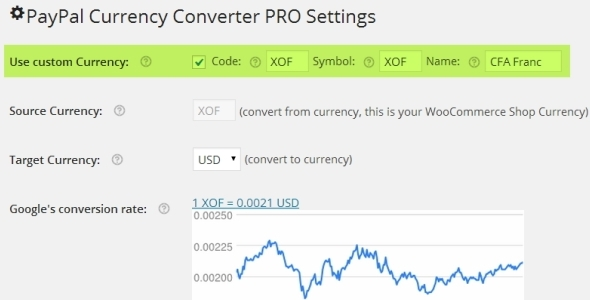
During checkout, PAYPAL CURRENCY CONVERTER PRO FOR WOOCOMMERCE plugin converts any given WooCommerce shop currency to allowed PayPal currencies for PayPal’s Payment Gateway. It automatically converts the shopping cart total, tax and shipping cost using Exchange Rates obtained from Open Exchange Rates API, Yahoo Finance, or European Central Bank. This plugin supports PayPal Digital Goods Gateway, PayPal Advanced, etc.

6. PayPal Plus for WooCommerce

PayPal Plus for WooCommerce plugin integrates all PayPal Plus payment methods(PayPal, Direct debit, Credit card and Pay upon invoice) into your WooCommerce shop. It is only available to customers who have their registered office in Germany. Other customers can make use of the payment methods PayPal and Credit card.

7. PayPal Pro for Woo

PayPal Pro for Woo plugin allows you to add PayPal Pro to your WooCommerce store.

Major features of this plugin are,
– PayPal testing through SandBox.
– Enable PayPal credit.
– Enable Send Item Details.
– Enable PayPal IPN

8. Paypal.me – An offline payment gateway

Using Paypal.me plugin, you can accept payments using PayPal.Me link or PayPal Email. This is an offline payment gateway and it also helps in collecting user’s information which can be used for marketing purpose.

9. PayPal Pro Payflow for Woo

PayPal Pro Payflow for Woo plugin integrates PayPal Pro Payflow gateway to your WooCommerce store.

Features offered by the Plugin
– PayPal testing through SandBox.
– Enable PayPal credit.
– PayPal Soft Descriptor.

10. PayPal for WooCommerce

PayPal for WooCommerce is a free plugin which helps to accept PayPal, Credit card and Debit card payments. It supports WooCommerce Payment Tokens. Also, it supports the following payment options,

– PayPal Website Payments Pro 3.0 (DoDirectPayment)
– PayPal Payments Pro 2.0 (PayPal Manager / PayFlow Gateway)
– PayPal Plus (Germany, Brazil, Mexico)
– PayPal Payments Advanced
– PayPal REST Credit Card Payments
– PayPal Braintree Credit Card Payments

11. PayPal Website Payments Pro for WooCommerce

PayPal Website Payments Pro for WooCommerce plugin allows you to accept Debit and Credit card payments from customers directly on checkout page via PayPal Payments Pro.

Features
– Adds Charge Id and Charge time to Order Note.
– It can work with test/sandbox mode.
– It does not need SSL.
– It does not store Credit Card Details.
– It is designed to work Only On REST API
– It supports to accept card types with dynamic card logo at checkout.

12. PayPal Multiple Emails for WooCommerce

PayPal Multiple Emails for WooCommerce allows you to accept PayPal Payments using second PayPal email address. This plugin also works with PayPal Standard.

13. PayPal REST Credit Card for WooCommerce

PayPal REST Credit Card for WooCommerce plugin allows you to accept credit card payments using PayPal REST API. To Configure this plugin you need to enable PayPal Credit Card Rest in WooCommerce settings and need to fill the required PayPal Credentials.

Features of this plugin are
– PayPal testing through SandBox.
– Enable PayPal credit.

14. PayPal Donations

PayPal Donations plugin let you add PayPal donation shortcode and sidebar Widget to WordPress. Using this plugin, you can use your own donation button on your site.

15. PayPal Buy Now Button

This PayPal plugin will allow you to sell products or services on your website using a PayPal Buy Now Button. It allows you to set cancel payment URL, successful payment URL, how the PayPal window opens, PayPal authorization mode – sale or authorize, etc.

16. WooCommerce PayPal Payouts

WooCommerce PayPal Payouts is a premium plugin developed by FantasticPlugins. Using this plugin, payments made by the user can be split into multiple PayPal Accounts(Maximum of 500 Receivers) per transaction. It works with the WooCommerce supported Payment Gateways.

It supports three types of Payouts. They are,
1. Automatic Payouts – The commission percentage specified by the admin will be automatically sent to the users.

2. Manual Payouts – The site admin has to manually send the commission to users.

3. Scheduled Payouts – Site Admin can schedule the commission for the users.

Features to be noted in this plugin are listed below,
– Allows to split the payments between a Maximum of 500 PayPal Accounts
– Payouts settings can be configured at Product Level, Category Level, and Global Level
– Payouts enabled products can be purchased through any Payment Gateways/Specific Payment Gateways
– Payouts settings can be hidden for specific User Roles
– Payouts can be processed for Renewal Orders[requires SUMO Subscriptions Plugin]

To know more about Popular WooCommerce Payment Gateways please check Top 25+ Popular WooCommerce Payment Gateway Plugins.